Vision Pro text input
Typing on Vision Pro meant a floating keyboard or speaking out loud. I designed a way to spell with your hands.
- Role
- Design and development
- Timeframe
- Fall 2024
- Team
- Solo
- Tools
- Swift, SwiftUI, ARKit, RealityKit

A · The brief
New ways to type on Vision Pro
NDSU’s Human-Computer Interaction course gave an objective and nothing else. The idea, design, and code were mine. I chose text entry on Apple Vision Pro, which had been on the market for less than a year.
The idea was to spell with your hands, using signs based on the American Sign Language alphabet, recognized on the device. visionOS doesn’t allow third-party keyboards, so the app has its own text field, and you copy what you write into other apps.
B · Taking it further
Typing without a keyboard or a voice
Vision Pro gave you two ways to type. The virtual keyboard is familiar but slow and inaccurate: you look at each key and pinch, one letter at a time. Dictation is comfortable, but it isn’t private, and it’s no use anywhere you can’t speak freely.
So the real problem was input that works anywhere: quiet, private, and driven by your hands instead of your eyes.
Explorations
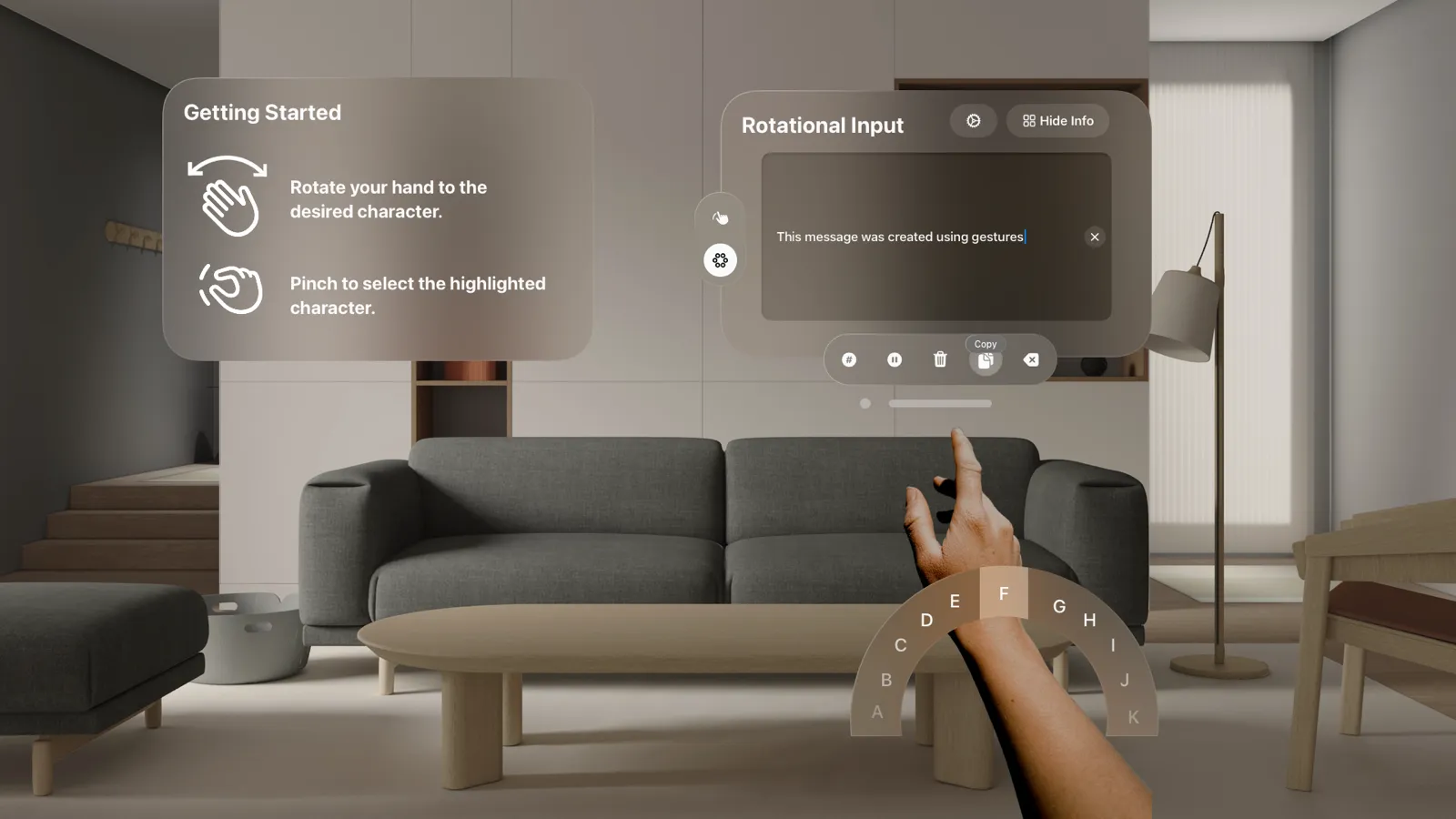
Fig. 2.1 A second input method, designed and then set aside: the alphabet on a dial around your wrist, like a combination lock. Rotate your hand to the letter and pinch to type it. I cut it to keep the scope small, not because it failed, and it may come back.

The solution


What the semester built, in the visionOS simulator
Spell with your hands
Each letter has a sign based on the ASL alphabet. The plan was an on-device Core ML model, trained on my own hands with Vision Pro’s sensors, recorded in several environments for a more accurate dataset. A recognized letter appears in the text field straight away, with a sound to confirm it.
Training that teaches both ways
Training mode asks you to hold a sign for three seconds. It teaches you the alphabet and collects data to tune the recognizer to your hand at the same time. When accuracy drops below a threshold, the app suggests a session, starting with the letters it’s least sure of.
Familiar from the first glance
Every control is a standard visionOS component with SF Symbols, so anyone who knows the system already knows the app. The input panel keeps the essentials one pinch away: copy, clear, and backspace.
What got built
By the end of the semester the app, Gestured, had its menus, the gesture chart, the text field with its editing and clipboard controls, and live ARKit tracking of 25 joints on each hand, streaming their positions. The recognizer itself, a Core ML model reading those joint positions, was designed but not built in time.
Impact and reflection
The semester ended with the interface and live hand tracking working, but not the recognizer. That was the honest result of an ambitious plan: a new platform, a language I was still learning, and three frameworks I’d never used.
Building it changed my prediction. Recognizing a letter could take more than a second, which would make spelling slower than even the virtual keyboard for most people. It could still serve people who are already fluent in the ASL alphabet, and low-vision users.
What I'd do next
Letters were the wrong unit. Signers rarely spell word by word; they use signs for whole words and combine them. Recognizing those would be a much better input method than fingerspelling, and that’s where I’d take it next.
The rotational dial is still on the table. It was set aside for scope, and it could return as a second input mode.